
By the end of this lesson
Open a local page and update text through the DOM.
Before you start
- Node.js 24 with a terminal and plain-text editor; the browser-only lesson is labelled separately.
- Complete lesson 17 or be comfortable with its examples.
Three words to know
- DOM
- The browser’s object representation of the page.
- Event listener
- A callback called when a particular event occurs.
- textContent
- A property that writes text without treating it as HTML markup.
1. Switch environments deliberately
This lesson runs in your browser, not through node lesson.mjs. Save the complete source below as counter.html in a fresh practice folder, then open it from your file manager in a browser. It needs no server, package install, login or network request. The script is placed after the elements it queries so those elements already exist.
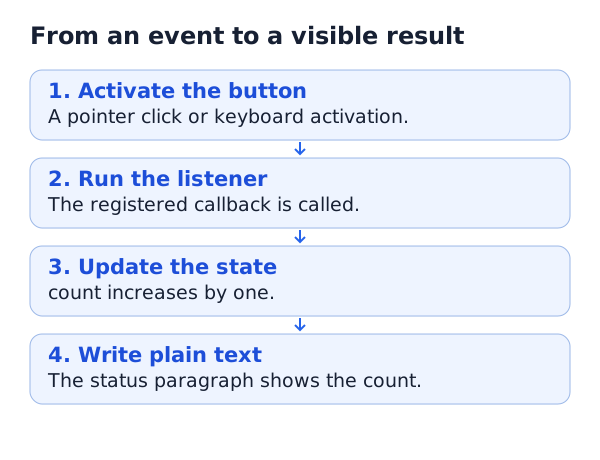
2. Read the complete small page
<!doctype html>
<html lang="en">
<head>
  <meta charset="utf-8">
  <meta name="viewport" content="width=device-width, initial-scale=1">
  <title>OpenViST practice counter</title>
</head>
<body>
  <h1>A small practice counter</h1>
  <button id="add" type="button">Add one</button>
  <p id="result" role="status">Count: 0</p>
  <script>
    let count = 0;
    const button = document.querySelector("#add");
    const result = document.querySelector("#result");
    button.addEventListener("click", () => {
      count += 1;
      result.textContent = `Count: ${count}`;
    });
  </script>
</body>
</html>
What you should see · example output
Initially: Count: 0. After two button clicks: Count: 2.
3. Use text and accessible controls
The native button works with pointer or keyboard activation. Its listener changes the count only when activated. textContent writes a text value; it does not parse HTML. Using innerHTML with untrusted text can create an injection vulnerability. role="status" announces updates to assistive technology without needing a modal dialog.
Reloading resets this counter to zero: the page does not use localStorage, cookies or a server to save progress. If nothing changes, check the browser developer console, the exact element IDs and whether you saved the file. This code is displayed as escaped source on OpenViST; it is not attached to OpenViST’s own page buttons.
YOUR TURN
A small check before you continue
Activate Add one three times using the keyboard, then reload. What should the count be before and after reloading?
Show a suggested answer
It should show Count: 3 before reload and Count: 0 afterward. The state lives only in this page instance, with no persistent storage.
Sources and scope
Documentation and examples reviewed 2026-10-18. Provider screens, package versions and output wording can differ. Examples show expected outcomes; they are not a claim that OpenViST connected to your server or verified your setup.