
By the end of this lesson
Write down the accepted input and failure behaviour before implementing the CLI.
Before you start
- Rust 1.90.0 or later, a terminal and a plain-text editor. Examples were tested with Rust 1.90.0, Edition 2024 on Linux.
- Complete lesson 27, or be comfortable explaining and running its examples.
Three words to know
- TSV
- Tab-separated fields; this project uses a deliberately small unquoted subset.
- Contract
- The exact input, output and error rules for an operation.
- Validation
- Checking all required conditions before producing a report.
1. Understand the idea
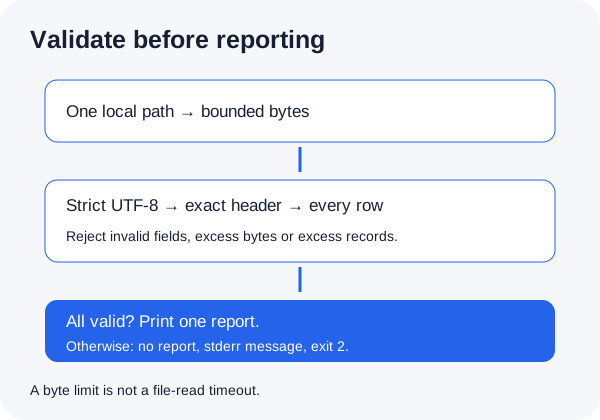
The project counts open and closed tasks; it does not print titles. Its input has header status<TAB>title, one or more records and LF line endings. Each record has exactly two fields. The title has 1–100 Unicode scalar values and no control characters. Status is exactly open or closed. Duplicate rows count separately. One final LF is optional; other empty rows are invalid. This is not a general CSV/TSV parser with quotes or multiline fields.
2. Save, run and observe
Save this complete program as lesson.rs in a fresh practice folder. It replaces that lesson file only; keep earlier examples separately. Compile it with rustc, then run the executable. Rust source goes in the editor; rustc and cargo commands go in the terminal.
fn main() {
    let line = "open\tRead the guide";
    match line.split_once('\t') {
        Some((status, title)) => println!("status={status}, title_scalars={}", title.chars().count()),
        None => println!("missing separator"),
    }
}
What you should see · example output
status=open, title_scalars=14
rustc --edition=2024 lesson.rs -o lesson
./lesson3. Explain the result
split_once finds the first tab; by itself it does not reject a second tab or an empty title. The finished validator must check those conditions too. It rejects invalid UTF-8, a BOM, CR/CRLF line endings, inputs over 65,536 bytes and more than 1,000 records. U+2028/U+2029 are allowed title scalars here; they are not LF record separators. Input errors produce no report, a generic stderr message and status 2.
YOUR TURN
A small check before you continue
Why must we not print a partial total after each accepted row?
Show a suggested answer
A later row may be invalid. Accumulate privately and print only after the entire accepted input has passed validation.
Sources and scope
Documentation and examples reviewed 2026-10-18. Provider screens, package versions and output wording can differ. Examples show expected outcomes; they are not a claim that OpenViST connected to your server or verified your setup.