
OPENVIST LEARN · FREE LESSONS
Rust foundations: from your first build to a tested CLI
Thirty beginner lessons: Cargo, types, ownership, borrowing, enums, errors, collections, traits, lifetimes, files and tests, ending with a bounded task-report CLI.
What you will build
Start with installation and saved source files, then learn to explain compiler feedback, ownership and borrowed references with small complete programs. No previous Rust experience, paid API, account or VPS purchase is required.
The tested reference toolchain is Rust 1.90.0, Edition 2024 on Linux. Use Rust 1.90.0 or later. Bash and Windows PowerShell invocation differences are explained; Windows needs the toolchain prerequisites in the official installer guide. Later toolchains and other operating systems were not separately executed for this release.
Allow about 12–16 hours including exercises. The final project uses only the standard library, reads a bounded local tab-separated task file and prints deterministic counts after validation. Source, fixture, Cargo manifest, MIT licence and tests are downloadable.
This is a foundations route, not a promise to cover every Rust feature. Async, advanced concurrency, unsafe code, FFI, frameworks and production deployment require their own lessons. Tests record concrete cases and do not establish exhaustive correctness.
Your learning path
- LESSON 1 · 25 MIN
Install Rust and compile your first program
Separate source code, the compiler and the executable, then print a greeting.
- LESSON 2 · 20 MIN
Cargo and your project folder
Create a Cargo package and distinguish source from build output.
- LESSON 3 · 20 MIN
Bindings, mutability and shadowing
Choose between an immutable binding, mutating a value and introducing a new binding.
- LESSON 4 · 20 MIN
Numbers and explicit conversion
Use integer types deliberately and handle failed parsing or arithmetic.
- LESSON 5 · 20 MIN
Strings, UTF-8 and character counts
Distinguish bytes, Unicode scalar values and what a reader sees as a character.
- LESSON 6 · 20 MIN
Functions and return values
Give a function typed parameters and return an expression.
- LESSON 7 · 20 MIN
Conditions and clear branches
Choose a branch with a boolean condition and return a value from if.
- LESSON 8 · 20 MIN
Loops, ranges and bounded work
Repeat work with a clear stopping rule.
- LESSON 9 · 20 MIN
Arrays, vectors and safe indexing
Store a sequence and handle an index that may be missing.
- LESSON 10 · 25 MIN
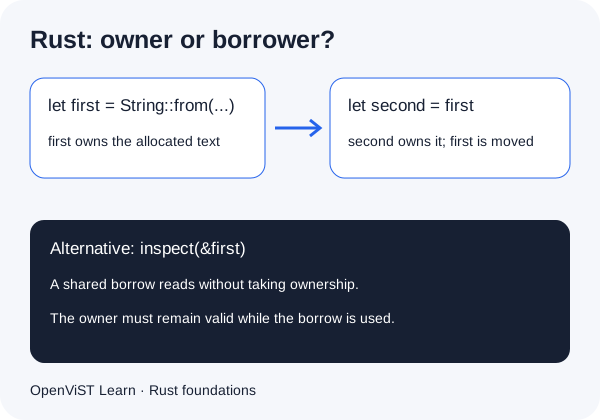
Ownership, moves and explicit clones
Explain why moving a String prevents use through its previous binding.
- LESSON 11 · 20 MIN
Shared references and borrowing
Pass a borrowed string to a function while keeping ownership.
- LESSON 12 · 20 MIN
Mutable borrows and non-overlapping use
Change an owned value through a mutable reference.
- LESSON 13 · 20 MIN
Slices and borrowed parts
Borrow a contiguous part of a sequence without copying it.
- LESSON 14 · 20 MIN
Structs, fields and methods
Group related data and define a method that borrows it.
- LESSON 15 · 20 MIN
Enums and exhaustive matching
Represent a small set of valid states with an enum.
- LESSON 16 · 20 MIN
Option and missing values
Handle both Some and None without assuming a value exists.
- LESSON 17 · 20 MIN
Result, errors and the question-mark operator
Propagate a failure with ? and report it at the boundary.
- LESSON 18 · 20 MIN
Modules, crates and visibility
Separate a helper behind a module boundary.
- LESSON 19 · 20 MIN
Maps, counts and deterministic output
Count repeated keys without relying on random iteration order.
- LESSON 20 · 20 MIN
Iterators and small closures
Build a readable transformation pipeline and consume it.
- LESSON 21 · 20 MIN
Generics and reusable functions
Describe one operation for several element types.
- LESSON 22 · 20 MIN
Traits and behaviour contracts
Use a trait bound to require a behaviour.
- LESSON 23 · 25 MIN
Lifetimes and returned references
Read a lifetime annotation as a relationship between borrows.
- LESSON 24 · 20 MIN
Read a local file with a byte limit
Read at most one byte beyond a chosen limit and validate UTF-8.
- LESSON 25 · 20 MIN
Command-line arguments and exit status
Read arguments without confusing them with source code or terminal syntax.
- LESSON 26 · 20 MIN
Unit tests and boundary cases
Run automated assertions for both success and failure.
- LESSON 27 · 20 MIN
Formatting, lints and dependency boundaries
Use Cargo checks without confusing style tools with correctness tests.
- LESSON 28 · 25 MIN
Define the task-report contract
Write down the accepted input and failure behaviour before implementing the CLI.
- LESSON 29 · 40 MIN
Build a bounded Rust task-report CLI
Combine files, validation, counters and error handling in a downloadable program.
- LESSON 30 · 30 MIN
Test, review and connect Rust recipes
Verify the downloaded program, inspect its limits and choose a next practice task.